RetailAdvice at the shelf
A few questions, then only the matches stay lit on the shelf
Decide with Light links a product adviser on a touch screen to one LED per product. Once three products or fewer remain, the screen shows the result.
Kapaso solution: Decide with Light is made by the publisher of this magazine.
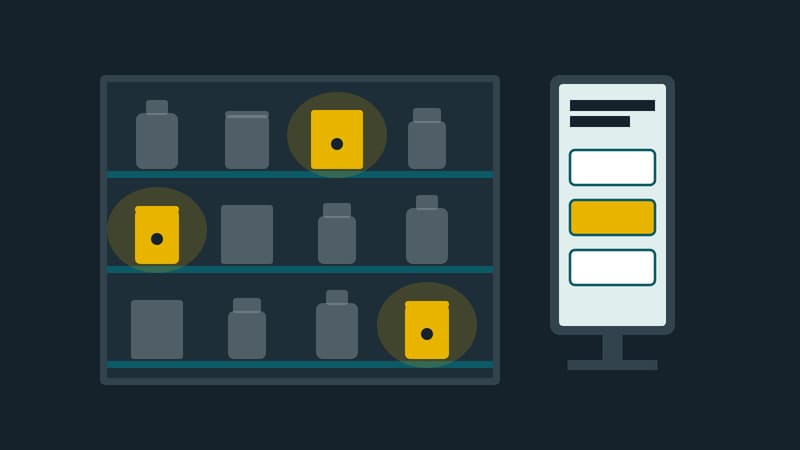
Thirty products that look much the same to a non-expert, and one sales assistant for the whole floor: in front of shelves like this, customers either stand there undecided or reach for what they already know. The price tag answers one question only. Which product suits their level of play, the occasion or their home is not written anywhere.
Decide with Light from Kapaso moves that advice to a touch screen at the shelf and makes the result visible on the shelf itself.
Darker with every answer
Every product at the location gets its own LED. At the start all of them are lit. The customer answers questions on the screen, for example about skill level, occasion or price range, and with each answer the LEDs of products that no longer qualify switch off.
Questions are asked only for as long as necessary. The logic behind this is short:
- Once three products or fewer remain, the screen shows the result straight away.
- A question to which only one answer would still be possible is skipped.
- The result is never empty.
How many questions an adviser contains is set by the retailer per project. The session ends with a product view showing image and data. The customer can compare products, take them along on a phone or have the text read aloud. The language is chosen at the start; the retailer sets up as many languages as needed.
Maintained in the browser
Questions, answers, products and locations are maintained in a browser-based back office that Kapaso calls DWL Studio. Colours, font sizes, texts and backgrounds are set per location, without programming. After release, the adviser is available as a page for any touch screen, tablet or screen with a browser. For signage players there is also a WGT package that runs offline; after each release the player fetches the new version through a fixed link.
The statistics show per location at which question customers drop out, which answers are chosen most often and which products are viewed most, along with the language chosen and sessions per day. The period can be set freely, and the data can be exported as a CSV table. According to the vendor, counting happens in the application itself, without third parties.
Where the limits are
The LEDs are hardware and not part of the software. The modules are available as an option on request, and how an LED is addressed has to be configured for each LED. That is installation work beyond maintaining questions. Without LEDs, Decide with Light works as an on-screen adviser only; for setup, a simulation shows what would light up on the shelf.
The statistics name the most viewed products. They do not provide a list of products that were never viewed; anyone who wants that has to compare the table with the range.
Reading aloud works in two ways. The natural-sounding voice is generated by a service from OpenAI in the United States, once at release; the audio file is shipped with the package and plays offline afterwards. Those who do not want this can let the device's own voice read.
The back office is operated by Kapaso, according to the vendor in a data centre in Germany. The vendor names sports, watches, household appliances and promotional campaigns as fields of use, in shops as well as in showrooms or at trade fair stands.
More information: dwlcms.de