Market and DOOHIntegration
Selling ad time without changing CMS: API or SMIL file
An advertising portal has to know which screens exist, what should run on them and what did run. Two ways of exchanging those three things with an existing system.
Kapaso solution: DOOH Hub is made by the publisher of this magazine.
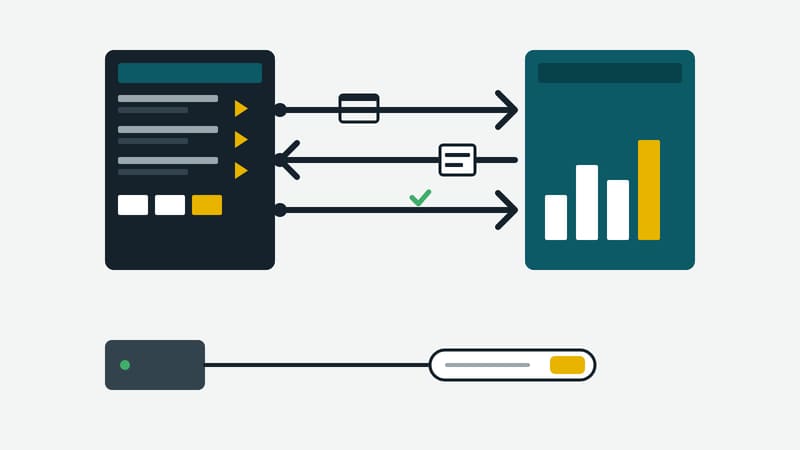
Screens in pharmacies, bakeries and gyms generally run on a content management system that was set up years ago. Playlists, schedules and devices all depend on it. If third-party advertising is to run on those screens, a second job comes along: offering the screens, taking bookings, proving what was played and invoicing for it. That is what an advertising portal does. The question is how the portal and the existing system talk to each other.
DOOH Hub, Kapaso's advertising portal, serves as an example of two ways to do it.
Three things that are exchanged
Whichever route is chosen, three pieces of information are involved:
- Which screens exist? Location, format, opening hours.
- What should run? The schedule: which creative, how often, in which time window.
- What did run? A report for every play.
The portal says what should run, how often and in which window. Where in the loop the creative sits is decided by the network's own system. The portal manages neither playlists nor devices.
Route 1: the API
If the network's system can work with an API, it registers its screens under the identifiers it already uses. It fetches the schedule, downloads the creatives and builds them into its own loop. After every play it sends a report back.
Two principles make operation easier. All connections start from the network's system; it needs no access point reachable from outside and no fixed address. And every scheduled slot is either confirmed or cancelled with a reason. No report is not treated as played.
The API has two levels. At the first, screens are merely registered and bookable, and the operator arranges playout by hand. At the second, the system fetches the schedule automatically.
Route 2: the SMIL file
Many players cannot talk to an API. They know exactly one address, call it at a fixed interval and play whatever comes back. For them the portal provides a ready-made playlist per screen in the open SMIL format. The address contains a key; there is no login on this route.
Two details show what matters with such players. The key stays the same permanently, because a player recognises its files by their address; if the address changes, it downloads everything again. And a screen that has been withdrawn receives a valid, empty list instead of an error. Given an error, the player would keep its old file and carry on showing expired advertising.
Play reports travel this way too. The portal records them as a weaker source than the log of a system with its own login.
With no integration at all
Screens can also be added by hand or from a CSV spreadsheet. They are then visible and bookable, but creatives have to be put into the loop manually.
Which route fits
- Your own CMS with developers, or a vendor willing to do the work: the API. It gives the stronger proof and leaves your system in control of the loop.
- Players that only poll one address: the SMIL file. No development effort, in exchange for less say over the order.
- A few screens to try it out: add them by hand and integrate later.
What to settle first
Before the technology come three questions for your own network. Are opening hours on record for every screen? Without them there is no way of working out how often a creative can be seen. Do the players report back reliably? A silent player leaves gaps in the proof; the portal sends an email when a player goes quiet. And who approves advertising: the network alone, or the owner of the premises as well?
Limits
Images are accepted as JPEG or PNG and videos as MP4. The portal offers no bridge to programmatic marketplaces. It is operated by the manufacturer; it cannot be installed on your own servers.
Details of the portal are at dooh-hub.com.