Health and public servicesAnalysis
The average hides how long people really wait at the citizens' office
Waiting time, handling time and throughput time are three different things. Which figures a report has to separate before it is any use for staffing.
Kapaso solution: KAS Control is made by the publisher of this magazine.
Average waiting time is the figure that goes into reports for the head of department or the practice owner. It is easy to calculate and easy to understand. It is not enough to tell whether enough desks are staffed at a given hour. Suppose the average is twelve minutes: every visitor may have waited about twelve minutes. Or nine in ten were seen after five minutes and the tenth sat for more than an hour. Both produce the same number.
A report that is useful for planning has to separate more. The statistics in KAS Control, the queue system made by Kapaso, show what that can look like.
First, keep three times apart
A visit consists of three stretches that often get lumped together under one word:
- Waiting time: from taking the number to the first call.
- Handling time: from the start of handling at the desk to its end.
- Throughput time: from taking the number to the end.
In its documentation the manufacturer describes a mistake of its own from an earlier version. A tile was labelled "average handling" but counted from taking the number to the end, which is throughput time. Anyone planning by that tile took handling to be two to three times longer than it was. Since version 1.1 the three measures have had different names and are reported separately. If a number is closed without handling having been started, it is left out of handling time. Otherwise waiting time would creep back in.
Five figures that say more
- Median and 90th percentile. The median is the waiting time that half of all visitors stay below. The 90th percentile is the time nine in ten stay below. If the two are far apart, say 9 and 34 minutes, there are peaks which the average smooths away.
- Service level. The share of visits called within a set time. The system's default is 15 minutes; each organisation can change it. The figure forces you to name a target.
- Comparison period. The same figures for the period of equal length immediately before. Without a comparison, a number is just a number.
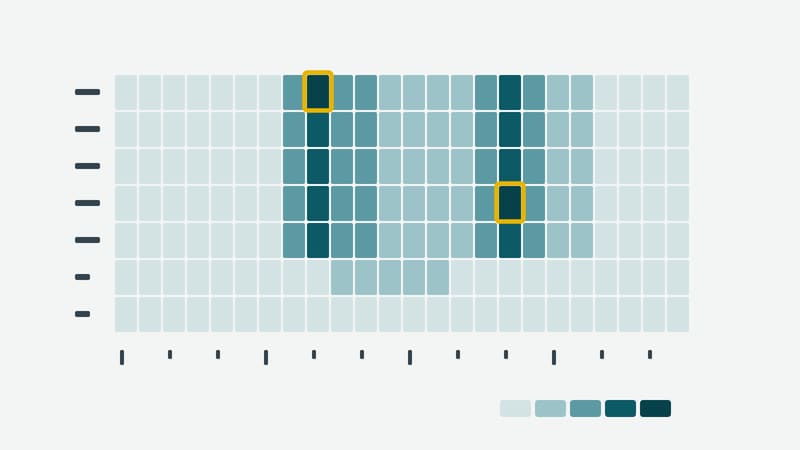
- Grid of weekday and hour. Seven by 24 cells, each with a count and an average wait. Only the combination reveals that Monday at eight and Thursday at four are the pinch points.
- Breakdown by service and desk. If a particular service regularly takes longer than planned, the problem lies with the procedure, not with staffing.
For the current day there is also an overview: how many are waiting, how many have been called or are being served, and how long the longest wait is right now, each compared with yesterday.
Without names
The statistics are calculated from the events of a visit: number taken, called, started, finished. They aggregate and, according to the manufacturer, do not evaluate individuals. For visitors that means the reporting needs neither a name nor a phone number. The figures can be downloaded as a CSV file and worked on in a spreadsheet.
The breakdown by staff member is a separate matter. Technically it is there; whether and how it is used is something an organisation is better off settling with its staff representatives beforehand.
What the figures do not answer
A report shows when things get tight. It does not say why. A high figure on Monday morning may be down to staffing, to a form nobody understands, or to closing early on Fridays. The figures narrow down where to look. The looking still has to be done by a person.
More details are available at kascms.de.